

AI-Solving the Telegram Event Saving Problem
AI Vibe Coding Working SolutionPermalink
In this article I will share how I explored vibe coding (An intuitive, exploratory approach to programming using AI that emphasizes creativity, flow, and experimentation over rigid structure or strict planning.) a quick and working solution to a personal problem. Maybe it will inspire you to solve one of your own daily problems, where solution used to be out of (effort-) reach?
The Problem: Manual Saving of Events in TelegramPermalink
I am no fan of the Telegram messenger, in several ways which is beyond the scope of this post, but it happens to be the platform where many events are shared in different groups in the city I live in. Thus, I’m more or less forced to use it.
In Telegram, I’m a member of several groups where events are share by users e.g. ecstatic dances, art nights, yoga and meditation classes etc. From time to time I drop in to check out what is on offer, and if I find something of interest I want to save this to my personal calendar, so that I can actually remember and potentially attend the event. The issue is that this is a lot of manual labor, that adds up when saving several events, involving copy-and-past event title, description, location, inserting right start and end times etc. Some events have a public web link that can be inserted, while some comes without which means that the event description must be added to the event as well. While I could copy a deep link to the Telegram message, I would like to avoid opening this app more than necessary (it’s an overwhelming and cluttered experience).
A typical free-structured event message shared in an Event-annoucement group:
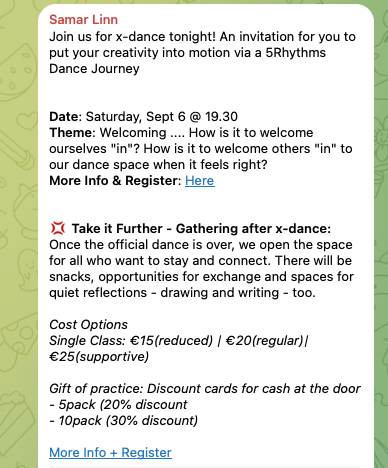
How to avoid manual copy-and-paste many information fields to my calendar?
Making a Plan with AIPermalink
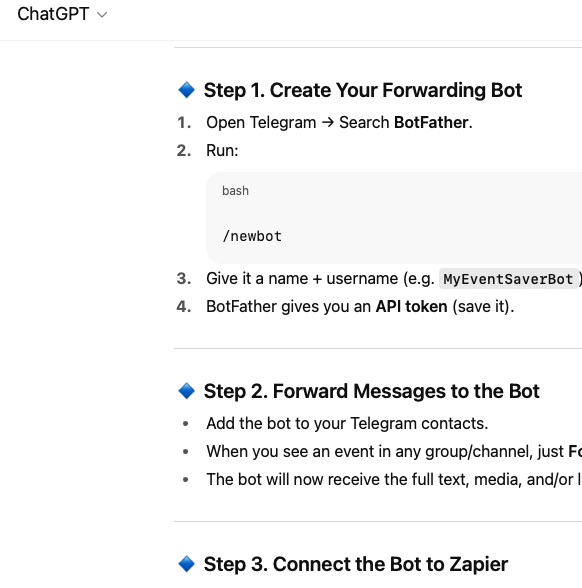
First step was to explore the solution space using ChatGPT. After explaining my problem and goals to ChatGPT, we collaborated on a solution that pointed to a simple set up of:
- Create a simple Telegram bot.
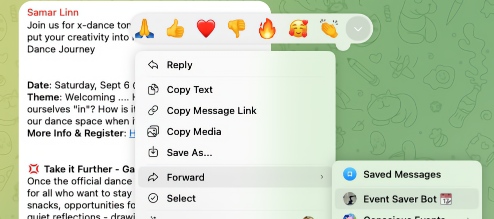
- When I find an event I want to save, I simply forward that message to the bot.
- The bot can accept also a direct message, allowing for the use case that I have copied to my clipboard the description of an event that came from another source like a WhatsApp message e.g.
- The bot could also accept a direct message containing just a plain URL, allowing for the use case that I found an event though some other means and it does have a public webpage.
-
Zapier (A no-code automation tool that connects apps and services so workflows run automatically.
) Flow (“Zap”)- The main part. The telegram bot uses a webhook to post received messages as input (trigger) to the Zapier flow
- The flow will then use a LLM (A Large Language Model — an AI trained on vast amounts of text to understand and generate human-like language.) step using ChatGPT as a parser to pick out the event details of the message.
- Finally the event is saved to a new event-calendar in my personal Google Calendar.
Seems doable!
Exploring the solution space and making a general plan with ChatGPT:
Executing the Plan with Vibe CodingPermalink
The Telegram bot creation was super simple, using the bot that create bots: @BotFather.
Delighted I was to discover that Zapier has no introduced AI Agents allowing users to let the agent do most of the flow design and details. Within two hours from starting, I had a working solution that already handled many different input cases and error scenarios. The outcome in terms of easy of use and result was way over my expectations!
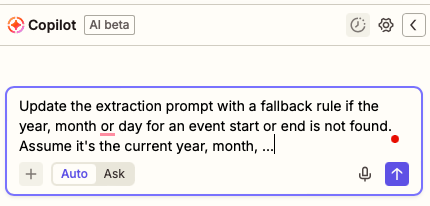
Now re-branded as “Copilot”, the agent makes Zap-creation a breeze with vibe coding:
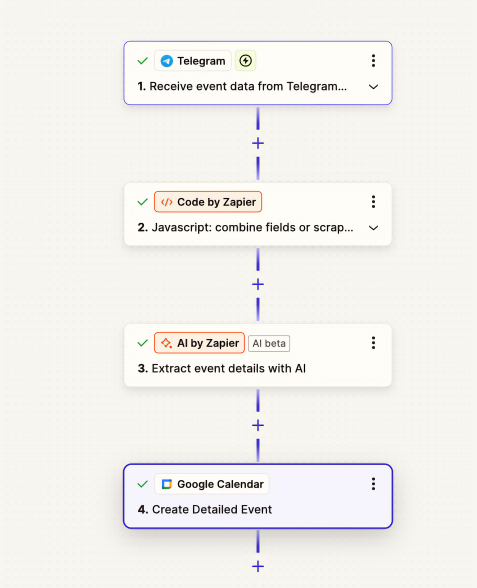
The Zap Flow is structured like this:
- Trigger: Telegram message from the linked bot created from before.
- It turns out that there is a ready Telegram integration in Zapier, so I did not even need to set up a manual webhook (A way for one app to instantly send data to another when an event happens, like a real-time notification. Like a callback in C-programming but for webservices using REST APIs.) configuration!
- Action: Message processing with custom JavaScript.
- As the Telegram messages will look a bit different depending on how they are sent, text preprocessing step was needed. Luckily the Zapier AI Agent (An autonomous AI that can reason, act, and interact with apps or people to achieve specific goals.) could write most of the code, I just needed to guide it though some iterations of extensions and error fixing.
- Combination: if a message was forwarded to the Telegram bot, it appears under one key in the input dictionary. If it was a direct message, in another. The custom code combines these two input keys to one output.
- If the input was a single URL, instead do a quick web scraping extracting readable text from the webpage.
- Some messages are formatted with hyperlinks in the text which are converted to plain text as the Zapier input. The URLs are stored in a separate array structure. The code iterates and collects all URLs as a separate output for further processing in the flow.
- Action: ChatGPT as a Information Extractor
- Most of the time I used “AI to use AI”, instructing the AI Agent to improve the ChatGPT prompt (The input or instruction given to an AI that guides its response or output.) used to extract event details. As I tested different real world examples of event posts shared in Telegram, I discovered more and more corner cases. This AI step extracts:
- Start and end datetime with instructions on fallback year/month if not mentioned and a fallback end time if not mentioned.
- Event title. Extract existing mentioned title in the post, or generate event summary as title.
- Event description.
- Location.
- Pricing or monetary contribution for attending the event.
- Structured collection of all URLs mentioned
- The actual prompt is shown further down
- Action: Create Event in Google Calendar
- Even though I use iCloud as my personal calendar, the easiest way forward was to create a Google Calendar that I subscribe to in my Apple Calendar, as there is no iCloud integration in Zapier at the moment.
- Given that the previous step outputted ready-to-use variables for each specified output, it was just a matter of inserting the right variables to the corresponding calendar event fields like title, location, start/end time etc.
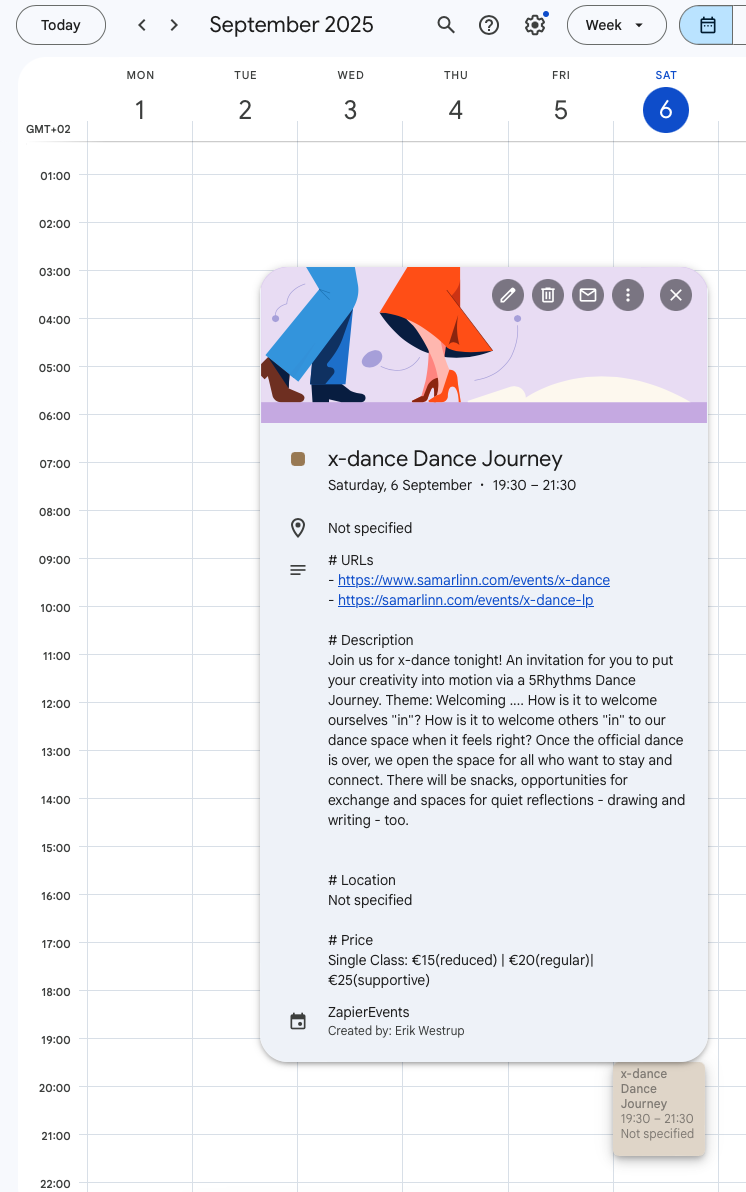
To my surprise, this really works, and great too! Now it’s as easy as tapping on a message with event info in Telegram and forward it to my custom bot. Then seconds later the event shows up in my personal event calendar with all information (mostly) correct! With the location, pricing and URL readily accessible, I can make a spontaneous decision on the day if an event I was interested in before will fit my day’s schedule and budget. If it does, there will be information in the calendar event on where to buy ticket and where and where I should be.
The Zapier flow looks visually like this:
Prompt for Data Extraction with ChatGPTPermalink
It could be interesting to see the actual AI-generated prompt (The input or instruction given to an AI that guides its response or output.) used for the ChatGPT extraction action. Most of it was AI generated and some details I jumped in and fixed myself:
Extract event details from the provided text. Parse out the following information:
- Event title (follow these rules):
• If the message has a clear title or event name, use it exactly
• If no clear title exists, create a concise 3-5 word summary of the event
• Make it descriptive but brief (e.g., "Tech Meetup Downtown", "Birthday Party Sarah", "Jazz Concert Friday")
- Start date and time combined (follow these rules for the time part):
• Extract the start time from the event details
• Combine with the date to create a complete datetime
• Use ISO 8601 format: YYYY-MM-DDTHH:MM:SS (e.g., 2024-03-15T19:00:00)
• If multiple times are mentioned (like a schedule), use the EARLIEST time as the start time
• DATE FALLBACK RULES:
- If no year is found in the text, assume it's the current year (2025)
- If no month is mentioned, assume it's the current month (January 2025)
- If only a day of week is mentioned (e.g., "Friday"), use the next occurrence of that day
- End date and time combined (follow these rules):
• If an explicit end time is mentioned, use it combined with the date
• If a duration is mentioned (e.g., "2 hours", "90 minutes"), calculate the end time by adding the duration to the start time
• If multiple times are mentioned (like a schedule), use the LATEST time as the end time
• If neither end time nor duration is available, set the end time to 2 hours after the start time
• Use ISO 8601 format: YYYY-MM-DDTHH:MM:SS (e.g., 2024-03-15T21:00:00)
• DATE FALLBACK RULES:
- If no year is found in the text, assume it's the current year (2025)
- If no month is mentioned, assume it's the current month (January 2025)
- If only a day of week is mentioned (e.g., "Friday"), use the next occurrence of that day
- Location (venue name, address, or area)
- URLs (follow these rules):
• Find ALL URLs mentioned in the text
• If a URL is missing "https://" prefix, add it automatically
• If no URL is found, the output of this field URLs is just "No URLs found"
• Return as a string with each URL on a separate line. Prefix each line with "- ", followed by the URL
• Examples: "- https://example.com\n- https://meetup.com/event123\n- https://meetup.com/event456"
- Price (follow these rules):
• Look for any pricing information in the text. This could also be stated as "donation" or "suggestion donation" or "energy exchange"
• Extract ticket prices, entry fees, cost information
• Include currency symbols and amounts (e.g., "$25", "€15", "Free", "$10-$50")
• If no price information is found, return "Not found"
- Event description (including details about the event, pricing, requirements, etc.)
If some information is not available, return "Not specified" for that field. Be thorough in extracting all relevant details and apply the datetime calculation logic carefully.
ResultsPermalink
Saving an event is now as easy as forwarding a message to the custom Telegram bot, or copy-and-paste a message or URL to it…
… then the event shows up in my personal Google Calendar event calendar!
A Brave New World with Vibes  Permalink
The accessibility of AI tools unlocks solutions that were previously no within reach. Not that they couldn’t have been done, but the effort-outcome balance was too much on the effort side. Without AI tools I would certainly not have even tried solving this minor annoyance in my daily life. But now I could with just two hours of fun vibe coding get a solution that actually works well. I’m curios to see what other smaller or larger problems now have solutions within reach!

Comments
songxiaoman
This is a really interesting approach to solving a common problem! I love how you leveraged AI, specifically ChatGPT and Zapier’s AI Agent, to automate the tedious task of saving Telegram event details. The ‘vibe coding’ concept sounds like a fantastic way to encourage experimentation and quick solutions. Have you considered how this might be extended to other messaging platforms or even different types of information extraction?
Leave a comment
Your email address will not be published. Required fields are marked *